

Why Use This System
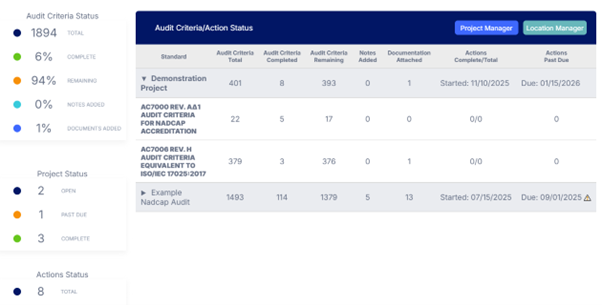
Our new automated system replaces manual self‑audits with a modern, digital workflow built for Nadcap® suppliers. With our new system, powered by IVIS, you can:
-
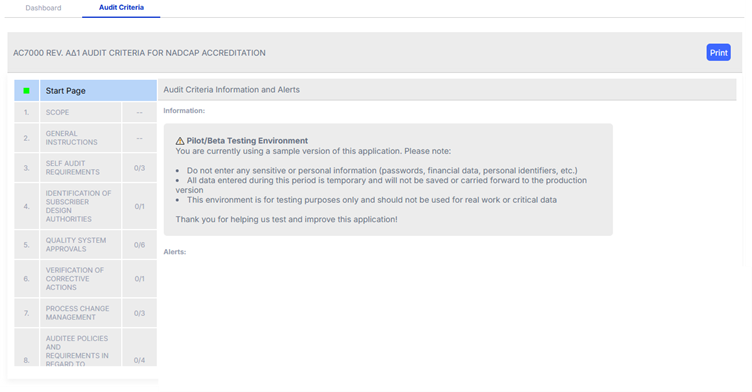
Use automated checklists aligned to Nadcap audit criteria
-
Attach objective evidence directly to each requirement
-
Add notes and comments for additional context
-
Create action items with owners and due dates
-
Track progress in real time with auto‑save
-
Export a clean, auditor‑ready PDF package
These features help reduce preparation time, improve consistency, and make audits easier for both suppliers and auditors.
Designed for Your Needs
This was designed with suppliers in mind, making the self‑audit process clearer, faster, and far more manageable, whether you’re a large multi‑site organization or a smaller facility preparing for your next Nadcap® Audit. With digital forms that mirror the official Nadcap criteria, this system helps you stay organized at every step by keeping all your notes, documents, and corrective actions in one place. You don’t have to worry about version control, misplaced paperwork, or inconsistent responses across your team. Everything is saved automatically as you work, and you can easily return to any section to make updates before exporting your final audit package. You have greater visibility into what’s complete, what still needs attention, and what should be reviewed internally, helping you feel more confident and better prepared when your audit date arrives.
-
Nadcap Self-Audit Automation Resources
Demonstration Document View this User Guide Snapshot Frequently Asked Questions Review a Self-Audit Automation FAQ
How to Access this Platform
Access is easy and follows the same pathway suppliers already use for Nadcap activities. When you choose to use the self-audit software through your Nadcap Audit in EAN, a link will provide access to the platform without requiring an additional login. Once you open the tool, you can begin your self-audit and select the applicable Nadcap Audit Criteria for your facility. If you’ve never used the platform before, the Quick Start Guide and Supplier User Guide walk you through each step so you feel comfortable navigating the system from day one.
Before you begin your self-audit, it may help to gather the documents and evidence you typically use to complete it. In the new platform, you can choose to attach the documents/evidence directly to each requirement as you answer it, helping you keep your evidence organized throughout the self-audit process, and allowing a second person to quickly review it. You will still need to reference the document/evidence in the completed self-audit because the attachments will not form part of the generated PDF file.
Once you’ve completed the applicable Audit Criteria, you can export the completed criteria as PDF files. These files can then be attached to the Self-Audit section of your Nadcap Audit in EAN.
Restricted Data Reminder
Do not upload sensitive technical data into the platform, powered by IVIS.
If you need to submit restricted information, email it to PRI at the designated restricted data inbox following the instructions in the Supplier User Guide.
